What is it?
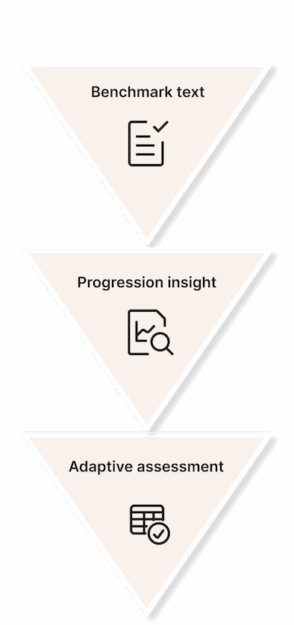
Progression Insight helps teachers and students see how a student’s writing has changed over time. It starts with a benchmark text—a piece of writing the student has done without outside help. This can be uploaded in courses by the student or the teacher.
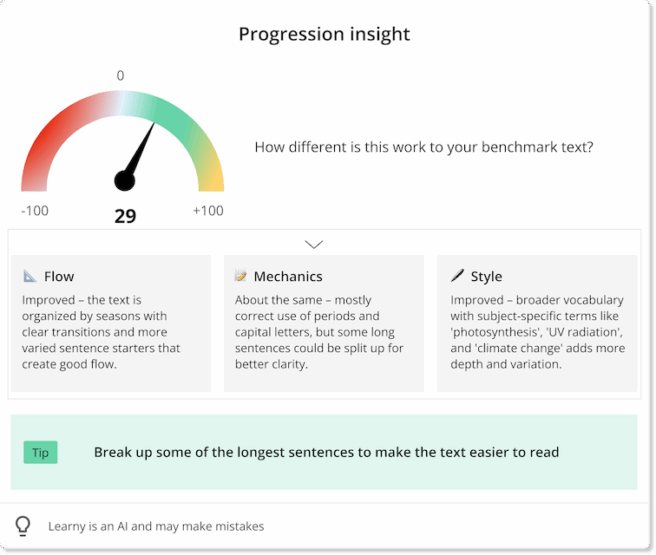
Later work is compared to this benchmark. The system gives a score from -100 to 100:
– Negative numbers mean the new text is worse than the benchmark.
– Around 0 means it’s about the same.
– Positive numbers mean it’s better—either because the student improved or got help.
The system also gives feedback in three areas:
Flow – how well the text is organized
Mechanics – grammar, spelling, and punctuation
Style – vocabulary, tone, and sentence rhythm
It even gives a tip to help improve writing. Students can use this feedback directly in book, to improve their writing and teachers can use it in courses to understand how much help the student has received. If teachers want, they can let students see their own Progression Insight card.